






Please download with PC browser
NoxPlayer is designed for Windows and MAC OS, please visit this website via computer browser to download NoxPlayer.

[Official authorization to revive the original manga]
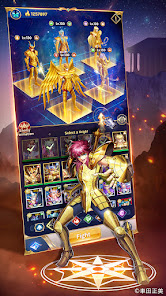
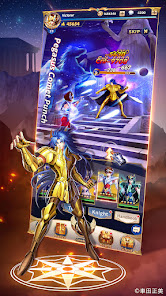
Adapted from Saint Seiya series and under the original writer Kurumada Masami's supervision! Classic plot reproduced by high-quality pictures. In the company of Seiya, Ikki, Shiryû, Hyôga, Shun, you can enter the sanctuary, challenge the 12 gold knights, smash the Master's conspiracy, and save the goddess Athena!
[Real-time fierce battle, burning your cosmo]
Play the 2022 brand new "Saint Seiya" mobile game anywhere and anytime which shows you heart-beating battles with 3D screen. Release the classic skills, Pegasus Meteor Punch, Rozan Rising Dragon Blow, Flying Phoenix on your finger!
[Collect knights to create the strongest team]
The 88 Knights under the goddess Athena assemble! Phoenix Ikki, Dragon Shiryû, Virgo Shaka, Gemini Saga...Gather your favorite knights to form the strongest formation for guarding goddesses!
[Strategic formation turns defeat into victory]
There are six elements of Water, Fire, Air, Earth, Light and Darkness, four types of Protector, Warrior, Assassin, and Skilled Knights, attribute restraint and control skills, there is no strongest knight but only stronger formation. Bronze knights counterattack gold knights, staged battle myths of turning defeat into victory!
[Tons of content provides you much fun to enjoy]
Form your teams, challenge the Twelve Palaces; experience Knight's Trial, Memory Space, Maze of Visions; dominate the Galaxian Wars, and participate in the challenge with guild members. Variety of gameplay awaits you!
[Classic voices redolent of youth memory]
Dubbed by dozens of Japanese top voice actors, Saint Seiya: Legend of Justice will awaken your youth memory, lead you back to the sanctuary, let cosmo burn again!





1Download NoxPlayer on your PC.

2Run the installation package and complete the installation.

3Search for Saint Seiya: Legend of Justice on NoxPlayer.

4Install the game in Google Play.

5Click the game icon to start it.

6Play Saint Seiya: Legend of Justice with NoxPlayer on PC easier!
Method 1. Click "Download on PC" to download NoxPlayer and apk file at the same time. Once installation completes, play the game on PC.
Method 2. If you already have NoxPlayer on PC, click "Download APK", then drag and drop the file to the emulator to install.
Please download with PC browser
NoxPlayer is designed for Windows and MAC OS, please visit this website via computer browser to download NoxPlayer.


